> ## Documentation Index
> Fetch the complete documentation index at: https://docs.sentrystudios.org/llms.txt
> Use this file to discover all available pages before exploring further.
# SentryLore
> A deep dive into configuring SentryLore, covering databases, formatting rules, item categories, and GUIs.
SentryLore generates two primary configuration files upon first startup: `config.yml` and `menu/gui.yml`. These files control the backend systems, RPG formatting rules, and the layout of the in-game menus.
Looking for the full default code templates? Check out the complete, downloadable versions by running the jar.
***
## 1. Main Configuration (`config.yml`)
The `config.yml` is the brain of the plugin. It dictates where custom items are stored, how your server's RPG lore is formatted, and integrates with external services like Discord.
### 1.1 Database Selection
SentryLore needs a place to store all the custom legendary items you register using `/lore save`.
```yaml theme={null}
database:
type: "H2" # Options: H2, MYSQL, SQLITE
mysql:
host: "localhost"
port: "3306"
database: "sentrylore"
username: "root"
password: "password"
```
**Frequently Asked Questions:**
* **Which database should I use?** If you run a single survival/factions server, use **H2**. It's fast, embedded, and requires zero setup. If you run a network (e.g., multiple servers connected via BungeeCord/Velocity) and want items to sync across them, you **must** use **MYSQL**.
### 1.2 RPG Formatting & Rarities
This is where the magic happens. You can completely customize the visual aesthetic of the lore engine here.
Control the symbols and colors injected into the vanilla items.
The bullet point character added before an item's display name.
The character injected next to attributes like Attack Damage.
The color applied to the actual numeric values of stats (e.g., the "7" in "+7 Attack Damage").
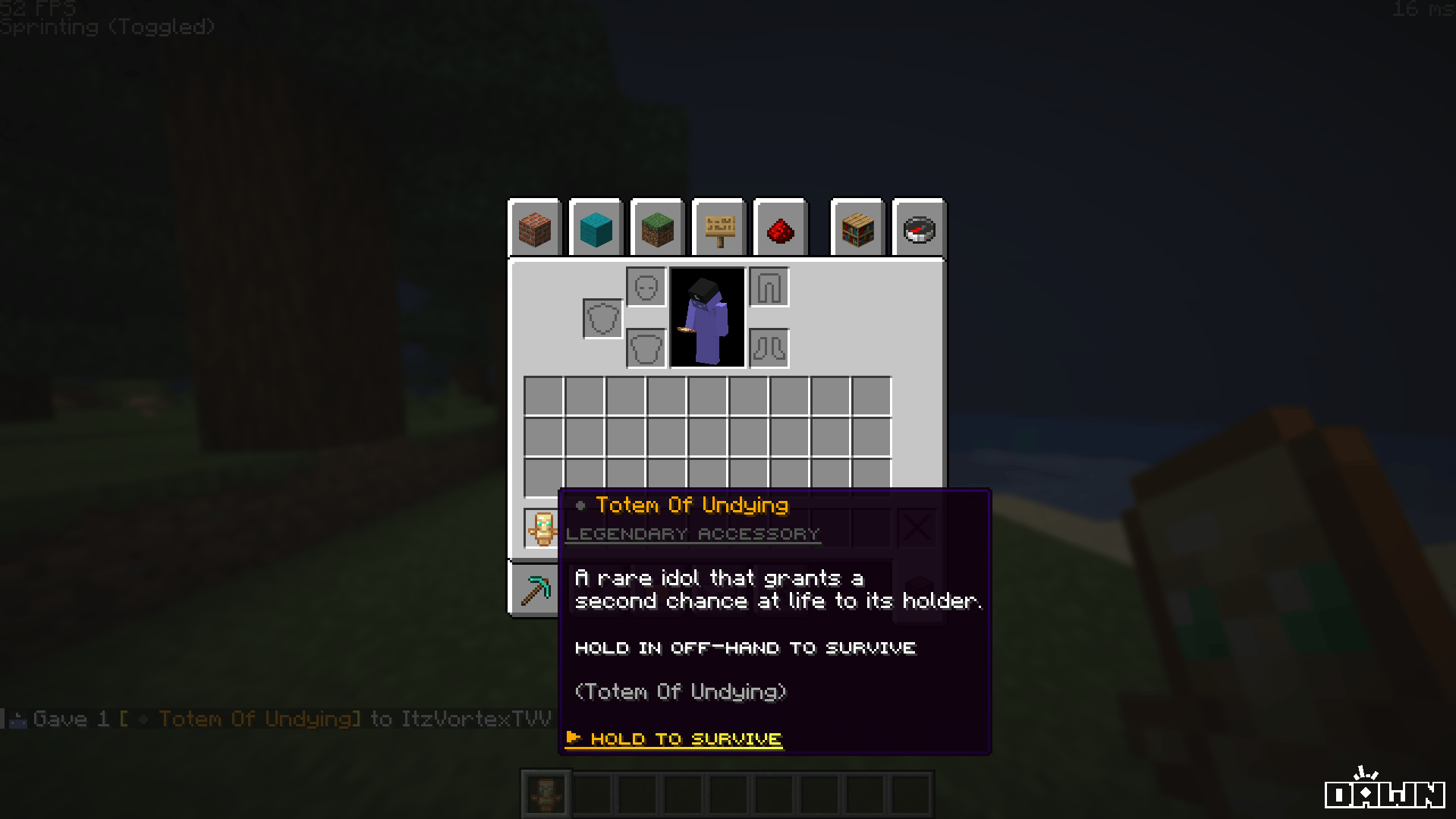
SentryLore uses Hex Gradients to make items pop. You can define the start and end colors for every rarity tier.
```yaml theme={null}
rarities:
LEGENDARY:
gradient-start: "#FFAA00"
gradient-end: "#FFFF55"
prefix: " &8● &6"
MYTHICAL:
gradient-start: "#FF5555"
gradient-end: "#FFAAAA"
prefix: " &8● &c"
```
The backend engine uses string matching to categorize items automatically. You can add your own custom item strings or modded items here!
```yaml theme={null}
material-categories:
WEAPON:
- "SWORD"
- "AXE"
- "MACE"
```
***
 ### 1.3 Discord Logging
To keep track of when administrators spawn in legendary items or wipe the database, you can hook SentryLore directly into a Discord channel.
```yaml theme={null}
discord:
enabled: true
webhook-url: "https://discord.com/api/webhooks/your-webhook-url"
username: "SentryLore Logs"
avatar-url: ""
embed-color: "#6eff4a"
```
**Common Pitfalls:**
* **"Why aren't logs sending?"** Double-check that `enabled: true` and that the URL is a valid Discord webhook string (not a channel link).
***
## 2. Interactive Menus (`menu/gui.yml`)
SentryLore includes several interactive GUIs (Admin Menu, Registry Menu, Settings Menu). All of these are highly customizable via the `menu/gui.yml` file.
**Small Caps Formatting:** The titles in `gui.yml` are written using special Small Caps Unicode characters (e.g., `Sᴇɴᴛʀʏʟᴏʀᴇ`). If your text editor does not support UTF-8 encoding properly, these may look like squares or corrupted characters. Always use a modern editor like VSCode or Notepad++!
### 2.1 Modifying Menu Items
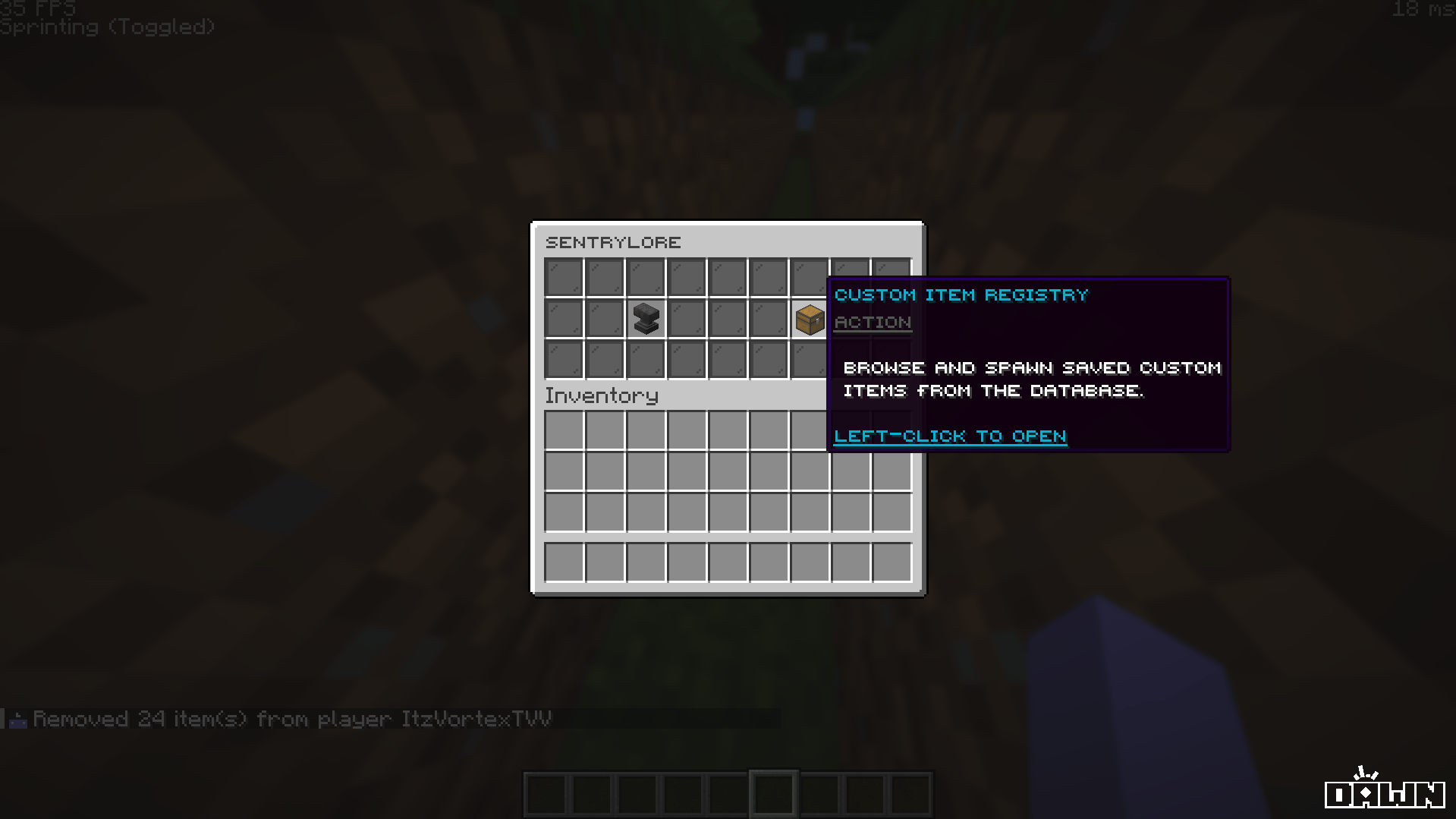
You can safely modify the items placed inside the menus, their slots, and their lore. For example, in the Admin GUI:
```yaml theme={null}
admin:
title: 'Sᴇɴᴛʀʏʟᴏʀᴇ'
size: 27
fill: BLACK_STAINED_GLASS_PANE
items:
registry:
slot: 15
material: CHEST
name: '�b4d8ᴄᴜsᴛᴏᴍ ɪᴛᴇᴍ ʀᴇɢɪsᴛʀʏ'
lore:
- '&8&nᴀᴄᴛɪᴏɴ'
- ''
- ' &fʙʀᴏᴡsᴇ ᴀɴᴅ sᴘᴀᴡɴ sᴀᴠᴇᴅ ᴄᴜsᴛᴏᴍ'
- ' &fɪᴛᴇᴍs ғʀᴏᴍ ᴛʜᴇ ᴅᴀᴛᴀʙᴀsᴇ.'
```
### 1.3 Discord Logging
To keep track of when administrators spawn in legendary items or wipe the database, you can hook SentryLore directly into a Discord channel.
```yaml theme={null}
discord:
enabled: true
webhook-url: "https://discord.com/api/webhooks/your-webhook-url"
username: "SentryLore Logs"
avatar-url: ""
embed-color: "#6eff4a"
```
**Common Pitfalls:**
* **"Why aren't logs sending?"** Double-check that `enabled: true` and that the URL is a valid Discord webhook string (not a channel link).
***
## 2. Interactive Menus (`menu/gui.yml`)
SentryLore includes several interactive GUIs (Admin Menu, Registry Menu, Settings Menu). All of these are highly customizable via the `menu/gui.yml` file.
**Small Caps Formatting:** The titles in `gui.yml` are written using special Small Caps Unicode characters (e.g., `Sᴇɴᴛʀʏʟᴏʀᴇ`). If your text editor does not support UTF-8 encoding properly, these may look like squares or corrupted characters. Always use a modern editor like VSCode or Notepad++!
### 2.1 Modifying Menu Items
You can safely modify the items placed inside the menus, their slots, and their lore. For example, in the Admin GUI:
```yaml theme={null}
admin:
title: 'Sᴇɴᴛʀʏʟᴏʀᴇ'
size: 27
fill: BLACK_STAINED_GLASS_PANE
items:
registry:
slot: 15
material: CHEST
name: '�b4d8ᴄᴜsᴛᴏᴍ ɪᴛᴇᴍ ʀᴇɢɪsᴛʀʏ'
lore:
- '&8&nᴀᴄᴛɪᴏɴ'
- ''
- ' &fʙʀᴏᴡsᴇ ᴀɴᴅ sᴘᴀᴡɴ sᴀᴠᴇᴅ ᴄᴜsᴛᴏᴍ'
- ' &fɪᴛᴇᴍs ғʀᴏᴍ ᴛʜᴇ ᴅᴀᴛᴀʙᴀsᴇ.'
```
 If you break the `gui.yml` file and the menus stop opening, you can simply delete the file and
restart the server (or run `/lore reload`) to let the plugin generate a fresh copy.